We put LOKI in STAR WARS with Adobe After Effects
 Jordy Vandeput
40K views

We modified Marvel's trailer 'Loki' to the Star Wars universe. Watch our Adobe After Effects breakdown how we did the VFX.
After Effects Compositing
To place Loki into the Star Wars universe we had to composite various clips together using Adobe After Effects. Searching on YouTube, we looked for Star Wars clips that would match the perspective of some of the shots from within the Loki movie trailer.
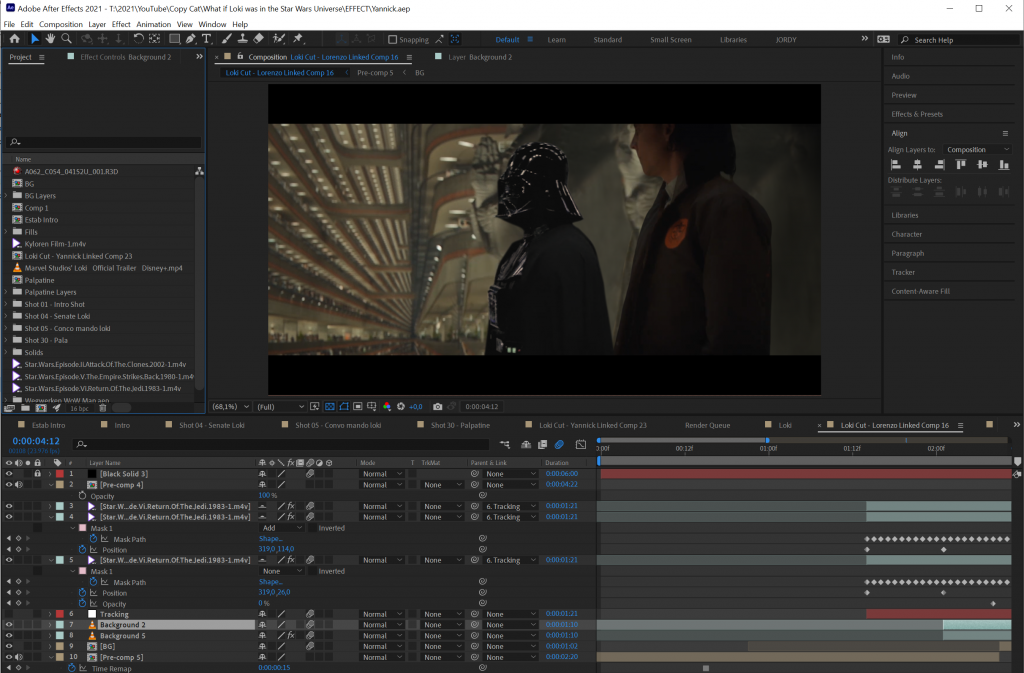
Compositing is not just about bringing different clips together. It's important to make your compositing as real as possible. That's why every clips needs to be color graded to match each other.
But apart from colors, we also need to try and match the sharpness/softness. If you're working with a moving shot, you're gonna have to motion track it first. Many things to keep in mind!
How to Place Yourself in a Movie?
Instead of compositing two films together, you could also bring yourself into a movie. We've done this several times before, using Adobe After Effects.
In an earlier episode we placed ourselves in Marvel's Avengers: Endgame. The process is fairly the same. the biggest advantage is that you have full control over lighting and camera perspective. This way you can match the shots you take to the film you're placing yourself in a whole lot better.
Last year we edited Jordy into the opening scene of an episode from Stranger Things. Although it was done roughly, the final results is pretty funny.

Milanote
Big thanks to Milanote for sponsoring this episode. Milanote is an easy-to-use tool to organize your ideas and projects into visual boards. We used their tool to help organize this project. Creating storyboards, to-do lists, assigning tasks and so much more.
As we work in a team of 6 people, having Milanote not only saved us time but also helped us maintain a better structure.
Create Your Own Board with Milanote
Jordy Vandeput
Founder of Cinecom · 2.75M+ subscribers on YouTube
Jordy Vandeput is a Belgian filmmaker who has taught practical filmmaking to millions through Cinecom. He breaks professional techniques down into clear, repeatable steps you can use on your very next project.






0 comments