10 Editing SECRETS You NEED in 2024 (Premiere Pro Tutorial)
 Jordy Vandeput
206K views

Learn 10 editing secrets that will help keep the viewers' attention in your videos in this Adobe Premiere Pro tutorial video.
Musical Rollercoaster In Premiere Pro!
What in the world does a music rollercoaster mean? Sounds like fun, right? It is! Imagine two identical videos next to each other. The first one has standard calm, chill and 'vibey' music underneath it. The second one changes in genre constantly. This is what I like to call the music rollercoaster. Imagine you have 5 chapters in your video, try choosing a different kind of song for every chapter. This enhances your story and keeps the viewer 'refreshed'. If you use 'elevator music' throughout your entire video, the viewer will eventually get bored and leave. This results in a lower retention, less watch time, less engagement and the list goes on!

Voice quality is a priority!
When you're watching a video with 'meh' video quality, but the audio sounds crystal clear, you can probably get away with it. But imagine watching a video with top notch video quality in 4K 60FPS, but the audio is so bad like someone's constantly flushing the toilet in the background. You get what I'm saying. When it's hard to hear a person speaking because of bad audio quality, the video quality doesn't really matter. Good thing you're about to learn an audio trick that will increase your audio instantly!
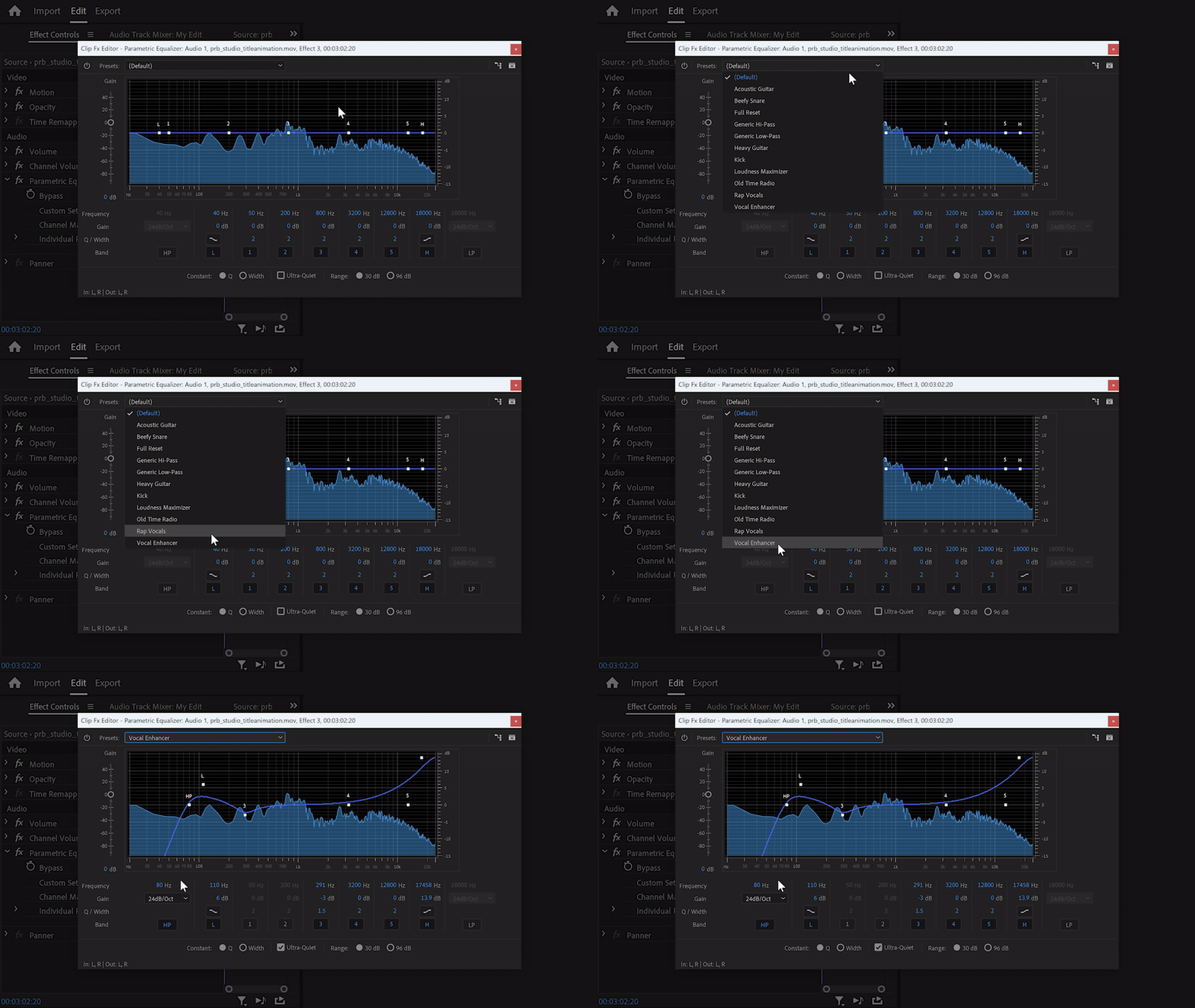
Simply use the parametric equalizer in Premiere Pro and drag it on your speech clip. Then once it's open, go to the preset menu and find 'Vocal Enhancer'. This preset has a EQ curve that will cut off the sub frequencies to remove rumbling. It also adds a little boost in low frequencies to add warmth. For clarity, the high frequencies will be boosted as well!
Storyblocks
I always download my stock assets like videos, music, sound effects and text templates from the storyblocks plugin. I don't have to leave premiere anymore and I can focus completely on my edit. Check out Storyblocks here!
Jordy Vandeput
Founder of Cinecom · 2.75M+ subscribers on YouTube
Jordy Vandeput is a Belgian filmmaker who has taught practical filmmaking to millions through Cinecom. He breaks professional techniques down into clear, repeatable steps you can use on your very next project.


0 comments