Top 5 New Features in Adobe Premiere Pro 2022
 Jordy Vandeput
134K views
Learn about the new features in the Adobe Premiere Pro 2022 update, such as Remix, Speech to Text, new editing workflow and more.
Learn about the new features in the Adobe Premiere Pro 2022 update, such as Remix, Speech to Text, new editing workflow and more.
Adobe Premiere Pro 2022 Update
The new update to Adobe Premiere Pro 2022 comes with a whole bunch of exciting new features. Although some are still in beta, everyone can try them out by installing the beta version from your Creative Cloud Desktop app.
Automatic Music Remix
Remix is probably the biggest new features to Premiere Pro. It's still in beta, but coming soon to the public release. Basically we can make any song shorter or longer in duration and Premiere Pro will automatically remix it to adjust the length.
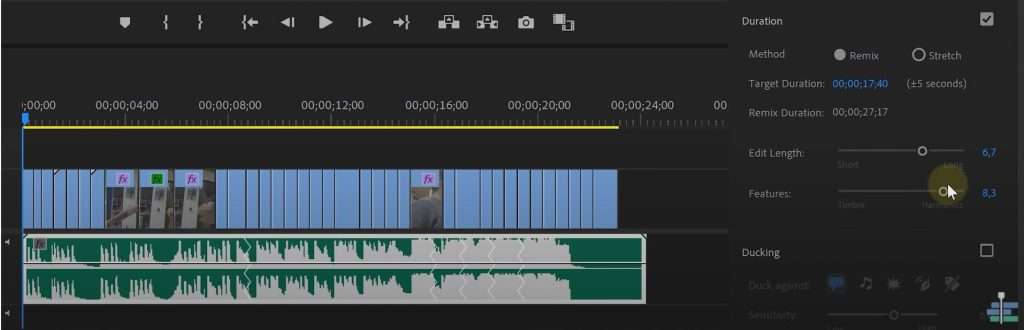
But it goes even further than that, we can also chose how Premiere Pro has to make new segments and focus more on timbre or harmonics.
Speech to Text
Since the beginning of the year we already had Speech to Text in the beta of Premiere Pro, but as of the October 2022 version it's now part of the release.
We have a new window called 'Text', which allows us to generate a text from speech. We can then create automatic captions of this text with a click of a button. This is a big timesaver! It even supports multiple languages.
Improved Editing Workflow
I'm personally not a big fan of this update, but I guess it could be useful to some. They've basically redesigned the project creation window, giving you the option to also select and import your footage.
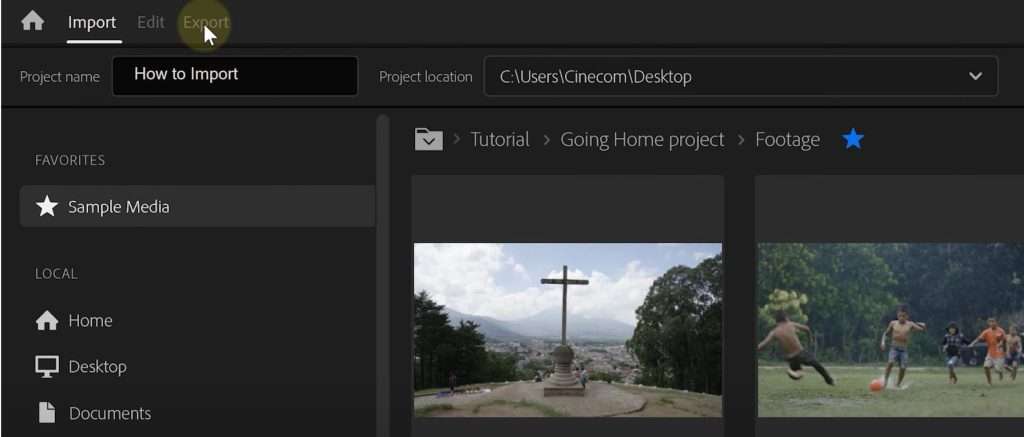
The editing workspace remains the same, but the export window is changed. Functionality wise, it's the same, but everything is organized more. I do like the simplicity of this new window.
Better Playback Support
There're many new improvements under the hood as well. We can see better playback support for 10-bit HEVC and H.264 formats, as well as some color management improvements for these file formats.
Lumetri UI Improvements
Finally we can see some improvements towards the Lumetri Curve, which is slightly bigger now. The Vectorscope and Histogram also got a slight update, making them brighter and easier to read.
Storyblocks
Big thanks to Storyblocks for the support on this video. Download unlimited stock assets such as 4K Royalty Free clips, Premiere Pro Templates, Animated Backgrounds and more.
There's a download plan for every budget, so definitely check it out!
Jordy Vandeput
Founder of Cinecom · 2.75M+ subscribers on YouTube
Jordy Vandeput is a Belgian filmmaker who has taught practical filmmaking to millions through Cinecom. He breaks professional techniques down into clear, repeatable steps you can use on your very next project.



1 comment
Hi... My Name Is Awais I am From Pakistan...... I really Like Your work And I wanna Tell You Something i want To Buy Some Luts For My Work........................................................ So If You Have Some Samples 'So Send Me Link Of Your Videos In Wich You Have Used . [email protected]